01 Apr
This release adds two major features in response to new fire safety legislation, plus a wide range of fixes and improvements since version 4.9.0.
Change Impact Legend
 Partner Suites
 Management Suites
What’s New
Flexible Responsibility Assignment
The Responsible Person / PAP and Manager / AP fields can now be assigned to a named individual, a group (such as “Building Safety Manager Team”), or free text such as a company name or job title — not just a single system user.
This addresses a common challenge in the residential sector: recording accountability in a way that is both legally meaningful and GDPR-compliant. Organisations can now choose what appears on published reports (for example, a role or team name) while retaining full internal traceability.
Building Emergency Evacuation Plans (BEEP)
In preparation for the Fire Safety (Residential Evacuation Plans) (England) Regulations commencing 6 April 2026, Risk Warden now includes full BEEP support through the Resident Portal.
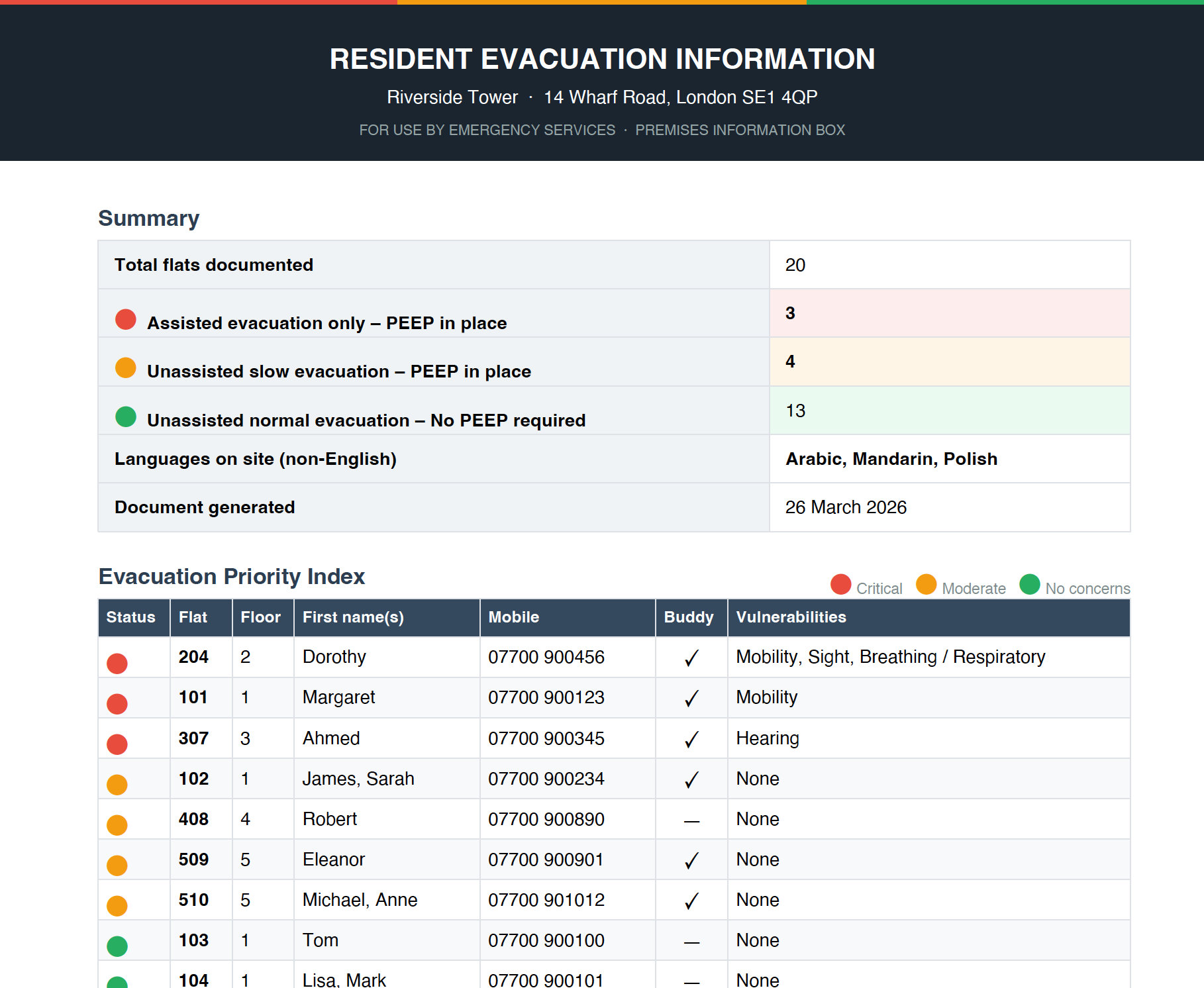
Each resident is automatically assigned an evacuation status — Red (Assisted Only), Amber (Unassisted Slow), or Green (Unassisted Normal) — based on their declared vulnerabilities. Building Safety Managers can override this where needed, with a full audit trail.
Residents and managers can also record designated buddies (name, contact, and relationship) to assist during an evacuation, along with consent for data sharing with the Fire and Rescue Service.
Two downloadable PDF reports are available at the building level:
- SIB Version — A single-page, data-protection-safe summary for Secure Information Boxes. Shows evacuation status and broad impairment categories only, with no names or contact details.
- Full Version — A detailed report with individual PEEP sheets for every red and amber resident, including buddy details, risk responses, and evacuation routes. Sections can be tailored on download.
Both reports sort residents by evacuation priority.
Fixes
Tasks and actions
- Completing a PPM task now automatically marks all related tasks complete in one step
- Uploading a document to a PPM now uses the document date as the new recurring start date
- PPM tasks no longer appear in risk assessment action lists
- You can now upload documents directly from within a task
- A “Days Until Due” countdown and overdue days column are now available in task list views
Assessments and risk
- Fixed a false “no permission” error when switching a risk assessment answer as the assessor
- Copied assessments now retain header and footer styling from the original
- Fixed issues where reassessment could incorrectly reset assessment status or produce date validation errors
- Fixed an issue where only active sections were counted in score calculations
Compliance and documents
- Fixed compliance score calculations where multiple assets are included in an assessment scope
- Fixed an issue where deleting a document was incorrectly marking unrelated compliance requirements as missing
- Fixed duplicate documents appearing in the estate document list
- A new “Realign Documents” action is available to correct compliance status inaccuracies caused by historical data
Dashboards and reporting
- Fixed dashboard widget positions and sizes not saving between sessions
- Fixed an issue preventing charts from being removed from a dashboard
Other fixes
- Fixed various supply chain contact records not saving correctly
- Fixed dropdown answers and “Approved By” field not displaying correctly in information reports
- Fixed URLs being stripped from email branding settings and display issues in Outlook notification emails
- Assessments are now restricted to users belonging to the correct company
- Fixed a “no permission” error when saving an asset with a PPM from the mobile app
- Several minor fixes to CEQ, portal search, estate access, and error handling