10 Apr
Version 4.11.0 introduces reusable cover note templates and smart placeholders across all summary templates, helping assessors save time and maintain consistency.
Change Impact Legend
 Partner Suites
 Management Suites
What’s New
Cover Notes
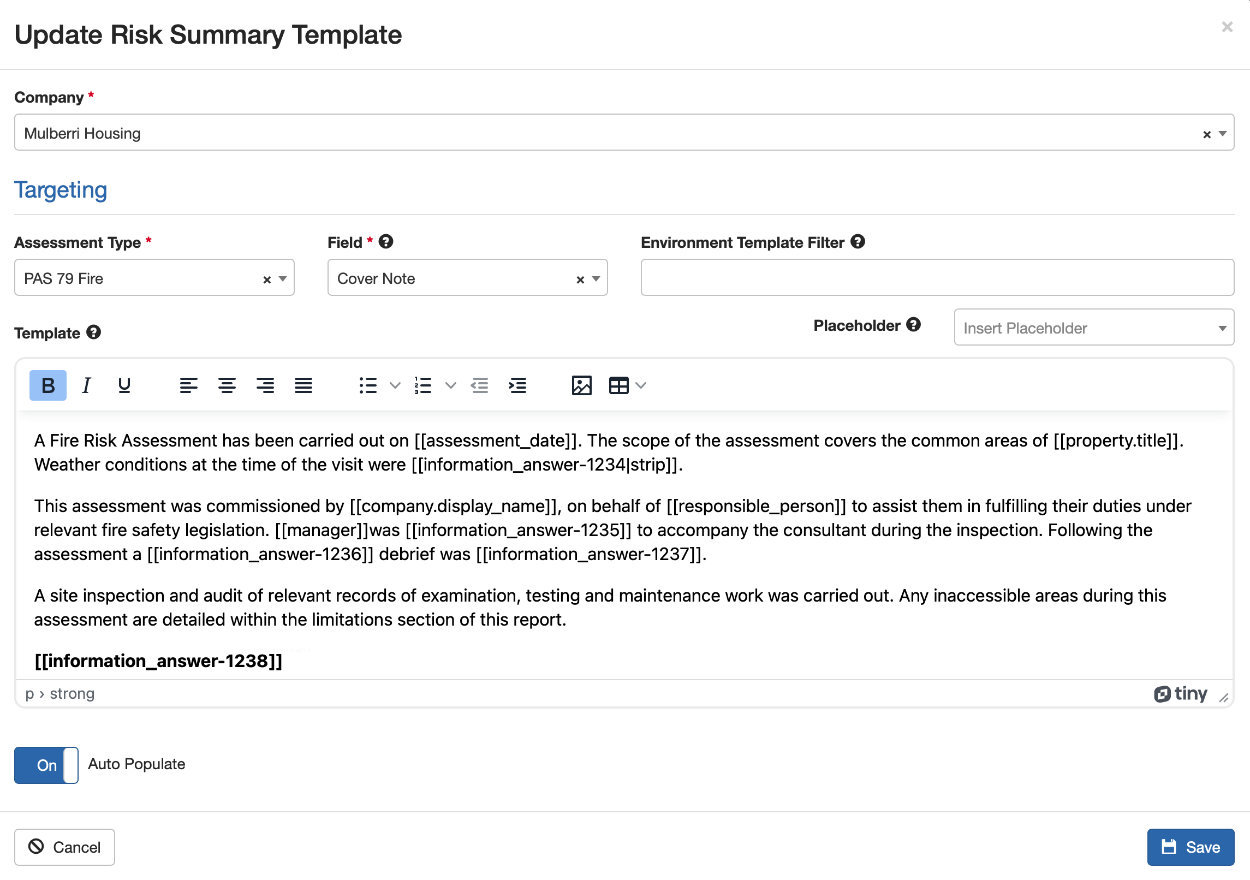
Assessors can now create and reuse Cover Note templates from the Summary Templates section, making it easier to maintain consistency across assessments.
Unlike other summary templates which apply to specific risk categories and sections (Header/Footer summaries), Cover Note templates apply to the assessment as a whole.
Cover Note templates support two application modes:
- Auto Populate – The template is automatically inserted into a new assessment’s cover note the first time the assessor reaches Step 4 (or opens the assessment), provided the cover note field is currently empty.
- Select Presets – Assessors can manually browse and apply available templates at any time using the “Select Presets” button on the cover note field.
Templates can also be filtered by Environment Template, ensuring that only relevant templates appear for each assessment type.
Smart Placeholders in Templates
All summary templates, Cover Note, Header, and Footer, now support smart placeholders: special tags that are automatically replaced with real data from the assessment when a template is applied.
Available placeholders include:
- Property details – name, address, type, construction summary, EWS information, and more
- Assessable Area details – building height, floor count, utilities, balcony type, and more
- Assessment details – assessment type, environment template, status, assessor name, consequence, likelihood, risk score, and risk rating